
Fake websites, hidden malware, and fraudulent security checks are all part of the same picture. Here is what to look out for.
Most online scams do not look like scams. They look like a checkout page, a travel booking site, or a familiar security prompt. The techniques vary, but the goal is usually the same: get you to hand over money or personal information before having a chance to think twice.
Fake websites
A fake website is one built to look like the real deal. Scammers copy the layout, logo, and language of a real platform, whether that is an e-commerce store, a hotel booking service, or a charity donation page, and set it up at a similar-looking web address. Someone searching for the real thing might land on the fake one instead, especially if the scammer has paid to push it up the search results.
The site will usually ask you to pay or enter personal details. Many of these sites push hard on urgency: limited stock, a deal expiring in minutes, a charity appeal with a tight deadline. Once you pay, nothing arrives. The scammer takes the money and the site disappears, or just keeps going and catches the next person.
Payments through direct bank transfers, QR codes, or gift cards are common on these sites because they are hard to reverse. That is not a coincidence.
Malicious links and hidden malware
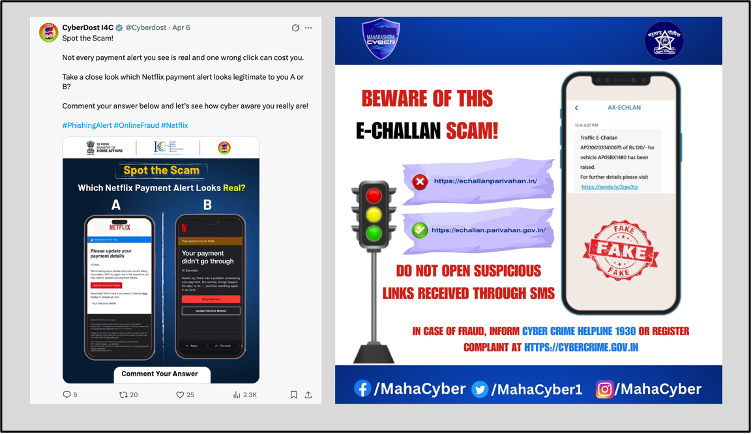
Not every threat asks you to pay something, some just need you to click. Malicious links are placed in ads, pop-ups, emails, and social media posts, often dressed up as a software update, a warning, or an offer. Clicking can install malware on your device, redirect you to a phishing page, or prompt you to download something harmful.
In some cases you do not even need to click. Certain malicious scripts can run as soon as a compromised page loads, without any interaction at all. This is less common but worth knowing about, since there is no obvious moment where you made a mistake.
Fake websites and malware often work together. A fake checkout site might quietly install something in the background. Malware already on your device might redirect you away from a real site to a fake one mid-transaction, and you would never know the switch happened.
Fake security checks on real websites
One variation worth knowing about involves websites that are otherwise legitimate. If a site’s server gets compromised, scammers can inject content into it without changing the web address or anything else that would make you suspicious.
A common version of this is a fake Cloudflare verification screen. It looks like the standard “prove you are not a robot” check that appears on many real sites. But instead of asking you to tick a box, it asks you to follow a few steps: press the Windows key and R, then Ctrl and V, then Enter.
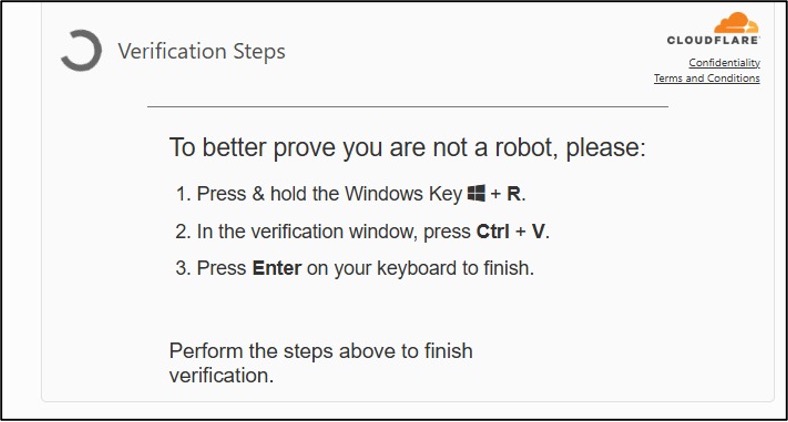
What is actually happening: the malicious page has already copied a command to your clipboard without you noticing. The keyboard shortcut opens Windows’ Run dialog, pastes the command in, and executes it. You have just run malware on your own machine while thinking you were completing a routine security check.
The real Cloudflare, and any other legitimate verification tool, will never ask you to use keyboard shortcuts or open anything on your computer. A real CAPTCHA is just a click, performing rudimentary maths, or identifying visuals like handwritten text or visuals.
What to do
- For fake websites: go directly to the platform rather than following links from emails, messages, or ads. Check the URL carefully before entering any details or making a payment. If a site is pushing you to act quickly, that is worth pausing on. Avoid paying through methods you cannot trace or reverse.
- For malicious links: do not click on links offering deals that seem too good, unsolicited software updates, or urgent security warnings from unfamiliar sources. Keep your browser and operating system updated, and use antivirus software that blocks threats in real time rather than just scanning after the fact.
- For fake verification prompts: if a website ever asks you to press keyboard shortcuts or open a system dialog as part of a security check, stop and close the page. That is not how any of those checks work.
The common thread across all of these is that they rely on you being in a hurry or not questioning what you see. Most of the time, slowing down for a moment is enough.
You can report any cybercrime incidents to the National Cybercrime Helpline by dialling 1930. You can also visit the National Cybercrime Reporting Portal at cybercrime.gov.in to register your complaint online.